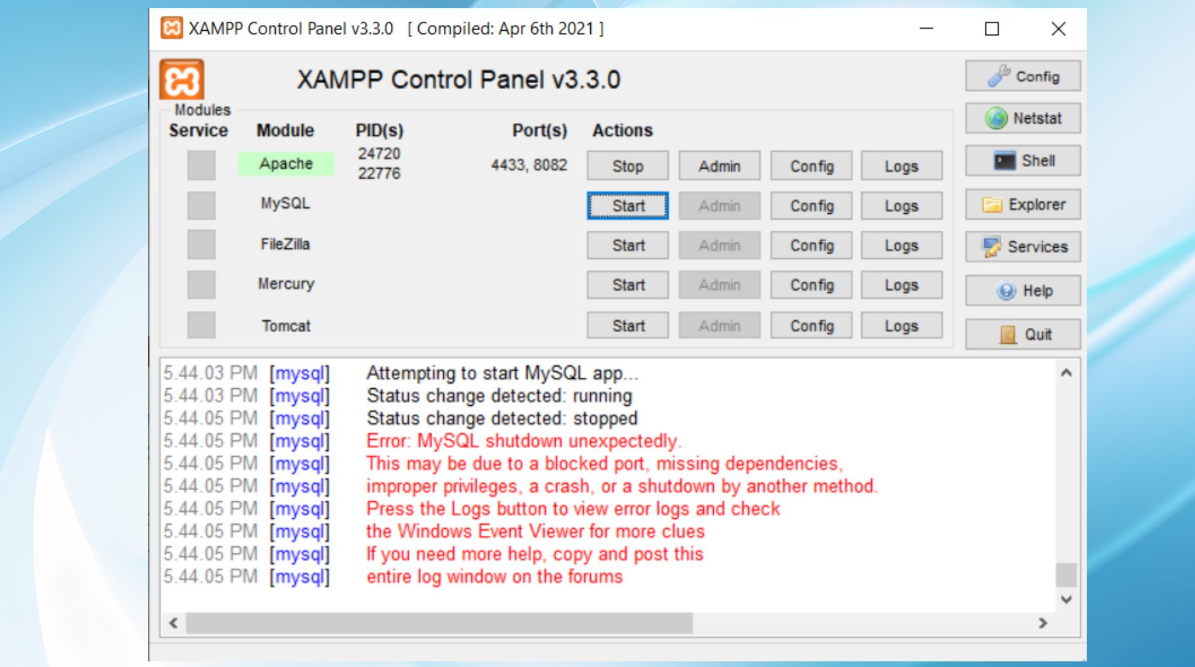
How can I solve - Error: MySQL shutdown unexpectedly? Share
Instead, you can first try using the MySQL backup folder which is included with XAMPP.
So do the next steps:
- Rename folder mysql/data to mysql/data_old
- Make a copy of mysql/backup folder and name it as mysql/data
- Copy all your database folders from mysql/data_old into mysql/data (except mysql, performance_schema, and phpmyadmin folders)
- Copy mysql/data_old/ibdata1 file into mysql/data folder
- Start MySQL from XAMPP control panel.
This is a temporary solution, not a permanent one. We strongly recommend backing up your data and reinstalling XAMPP after restoring it. This error is caused by a malfunction of some files in XAMPP, not the database.
Important: Please don't delete the ibdata1 file. You could destroy all your databases.
![Unknown Collation [FIXED] : utf8mb4_0900_ai_ci In MYSQL](https://elevenstechwebtutorials.com/assets/content/1673553215.png)



 Click to Join



Comments 0