Sent mail using SMTP in Codeigniter Share
In this tutorial, we are going to learn about how to sent email using SMTP in codeigniter. The CodeIgniter email library will be used to send email using SMTP server.
Step 1 :- Create View in View Folder (email_send.php)
<h2>Sent Email Using SMTP</h2><br>

<form>
    <input type="email" name="from" class="form-control" placeholder="Enter Email" required><br>
    <textarea name="message" class="form-control" placeholder="Enter message here" required></textarea><br>
    <button type="submit" class="btn btn-primary">Send Message</button>
</form>
Step 2 :- Create Sent Mail Controller for view in Controller Folder (Email_send.php)
<?php
defined('BASEPATH') OR exit('No direct script access allowed');

class Email_send extends CI_Controller {

	public function index()
	{
		$this->load->view('email_send');
	}

}
Step 3 :- Create Action, Method to send mail
The following HTML code below creates an uploader form. This form is having method attribute set to action, post .
<form action="<?php echo base_url(); ?>email_send/send" method="post">
Step 4 :- Create Send mail Function in Email Send Controller
public function send()
{
    $to =  $this->input->post('from');  // User email pass here
    $subject = 'Welcome To Elevenstech';

    $from = 'pass your email ID';              // Pass here your mail id

    $emailContent = '<!DOCTYPE><html><head></head><body><table width="600px" style="border:1px solid #cccccc;margin: auto;border-spacing:0;"><tr><td style="background:#000000;padding-left:3%"><img src="http://elevenstechwebtutorials.com/assets/logo/logo.png" width="300px" vspace=10 /></td></tr>';
    $emailContent .='<tr><td style="height:20px"></td></tr>';


    $emailContent .= $this->input->post('message');  //   Post message available here


    $emailContent .='<tr><td style="height:20px"></td></tr>';
    $emailContent .= "<tr><td style='background:#000000;color: #999999;padding: 2%;text-align: center;font-size: 13px;'><p style='margin-top:1px;'><a href='http://elevenstechwebtutorials.com/' target='_blank' style='text-decoration:none;color: #60d2ff;'>www.elevenstechwebtutorials.com</a></p></td></tr></table></body></html>";


    $config['protocol']    = 'smtp';
    $config['smtp_host']    = 'ssl://smtp.gmail.com';
    $config['smtp_port']    = '465';
    $config['smtp_timeout'] = '60';

    $config['smtp_user']    = 'Gmail ID Enter Here';    //Important
    $config['smtp_pass']    = 'Gmail ID Password pass here';  //Important

    $config['charset']    = 'utf-8';
    $config['newline']    = "\r\n";
    $config['mailtype'] = 'html'; // or html
    $config['validation'] = TRUE; // bool whether to validate email or not


    $this->email->initialize($config);
    $this->email->set_mailtype("html");
    $this->email->from($from);
    $this->email->to($to);
    $this->email->subject($subject);
    $this->email->message($emailContent);
    $this->email->send();

    $this->session->set_flashdata('msg',"Mail has been sent successfully");
    $this->session->set_flashdata('msg_class','alert-success');
    return redirect('email_send');
}
Step 5 :- Create Success Mail Message in Email View
<h2>Sent Email Using SMTP</h2><br>

  //Success Flash message available here ..............

  <?php if($error = $this->session->flashdata('msg')){ ?>
       <p style="color: green;"><strong>Success!</strong> <?php echo  $error; ?><p>
  <?php } ?>

  //End Flash message available here ..............


<form action="<?php echo base_url(); ?>email_send/send" method="post">
   <input type="email" name="from" class="form-control" placeholder="Enter Email" required><br>
   <textarea name="message" class="form-control" placeholder="Enter message here" required></textarea><br>
   <button type="submit" class="btn btn-primary">Send Message</button>
</form>
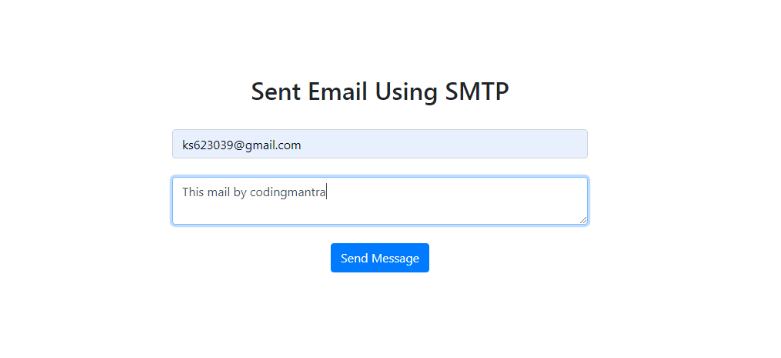
Step 6 :- Result

Hope this will help our developers.


 Click to Join


Comments 0