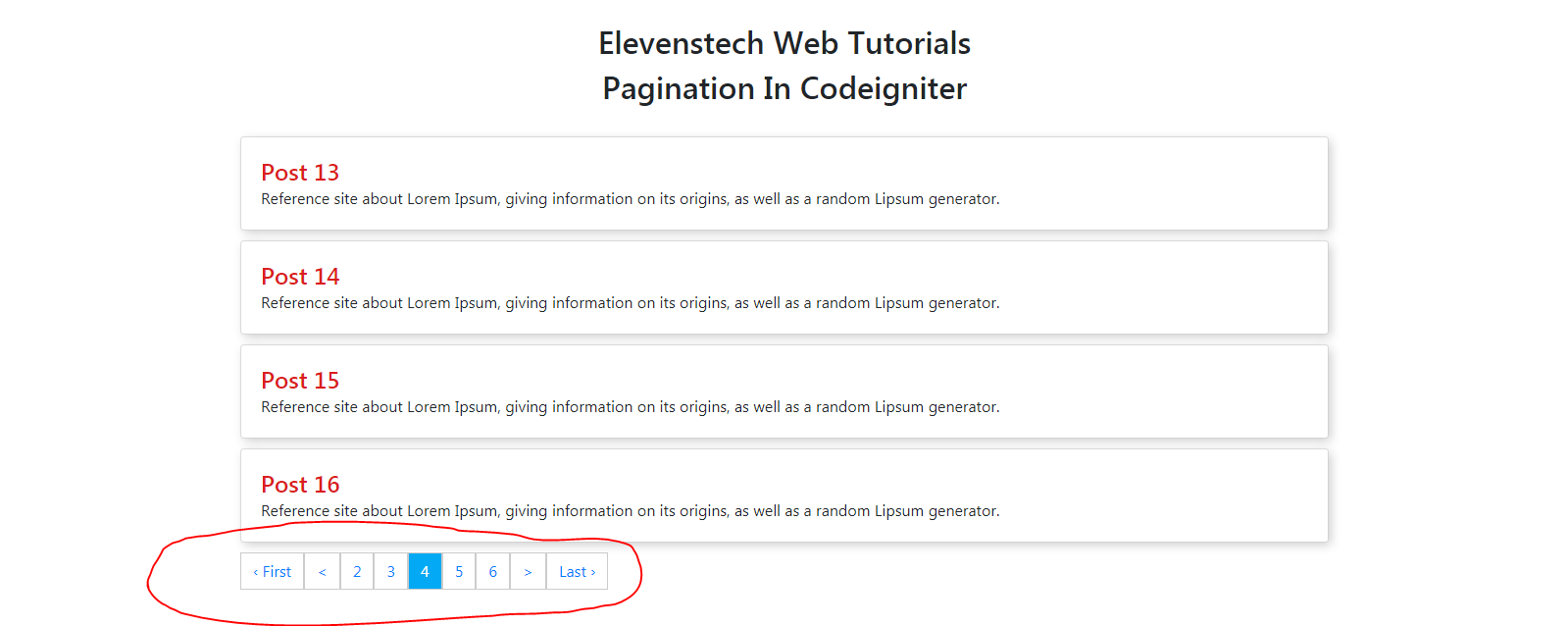
Pagination in Codeigniter Share
In this tutorial, we are going to teach you, how to create pagination in codeigniter.
Step 1 : Create pagination table in database.
CREATE TABLE `elevenstech_tutorial`.`pagination` ( `id` INT NOT NULL AUTO_INCREMENT , `title` VARCHAR(300) NOT NULL , `description` VARCHAR(500) NOT NULL , PRIMARY KEY (`id`)) ENGINE = InnoDB;
Step 2 : Insert some posts details in pagination table.
INSERT INTO `pagination` (`id`, `title`, `description`) VALUES (NULL, 'Past 1', 'Reference site about Lorem Ipsum, giving information on its origins, as well as a random Lipsum generator.'), (NULL, 'Post 2', 'Reference site about Lorem Ipsum, giving information on its origins, as well as a random Lipsum generator.'), (NULL, 'Post 3', 'Reference site about Lorem Ipsum, giving information on its origins, as well as a random Lipsum generator.'), (NULL, 'Post 4', 'Reference site about Lorem Ipsum, giving information on its origins, as well as a random Lipsum generator.'), (NULL, 'Post 5', 'Reference site about Lorem Ipsum, giving information on its origins, as well as a random Lipsum generator.'), (NULL, 'Post 6', 'Reference site about Lorem Ipsum, giving information on its origins, as well as a random Lipsum generator.'), (NULL, 'Post 7', 'Reference site about Lorem Ipsum, giving information on its origins, as well as a random Lipsum generator.'), (NULL, 'Post 8', 'Reference site about Lorem Ipsum, giving information on its origins, as well as a random Lipsum generator.'), (NULL, 'Post 9', 'Reference site about Lorem Ipsum, giving information on its origins, as well as a random Lipsum generator.'), (NULL, 'Post 10', 'Reference site about Lorem Ipsum, giving information on its origins, as well as a random Lipsum generator.'), (NULL, 'Post 11', 'Reference site about Lorem Ipsum, giving information on its origins, as well as a random Lipsum generator.'), (NULL, 'Post 12', 'Reference site about Lorem Ipsum, giving information on its origins, as well as a random Lipsum generator.'), (NULL, 'Post 13', 'Reference site about Lorem Ipsum, giving information on its origins, as well as a random Lipsum generator.'), (NULL, 'Post 14', 'Reference site about Lorem Ipsum, giving information on its origins, as well as a random Lipsum generator.'), (NULL, 'Post 15', 'Reference site about Lorem Ipsum, giving information on its origins, as well as a random Lipsum generator.'), (NULL, 'Post 16', 'Reference site about Lorem Ipsum, giving information on its origins, as well as a random Lipsum generator.'), (NULL, 'Post 17', 'Reference site about Lorem Ipsum, giving information on its origins, as well as a random Lipsum generator.'), (NULL, 'Post 18', 'Reference site about Lorem Ipsum, giving information on its origins, as well as a random Lipsum generator.'), (NULL, 'Post 19', 'Reference site about Lorem Ipsum, giving information on its origins, as well as a random Lipsum generator.'), (NULL, 'Post 20', 'Reference site about Lorem Ipsum, giving information on its origins, as well as a random Lipsum generator.'), (NULL, 'Post 21', 'Reference site about Lorem Ipsum, giving information on its origins, as well as a random Lipsum generator.'), (NULL, 'Post 22', 'Reference site about Lorem Ipsum, giving information on its origins, as well as a random Lipsum generator.'), (NULL, 'Post 23', 'Reference site about Lorem Ipsum, giving information on its origins, as well as a random Lipsum generator.'), (NULL, 'Post 24', 'Reference site about Lorem Ipsum, giving information on its origins, as well as a random Lipsum generator.'), (NULL, 'Post 25', 'Reference site about Lorem Ipsum, giving information on its origins, as well as a random Lipsum generator.'), (NULL, 'Post 26', 'Reference site about Lorem Ipsum, giving information on its origins, as well as a random Lipsum generator.'), (NULL, 'Post 27', 'Reference site about Lorem Ipsum, giving information on its origins, as well as a random Lipsum generator.'), (NULL, 'Post 28', 'Reference site about Lorem Ipsum, giving information on its origins, as well as a random Lipsum generator.'), (NULL, 'Post 29', 'Reference site about Lorem Ipsum, giving information on its origins, as well as a random Lipsum generator.'), (NULL, 'Post 30', 'Reference site about Lorem Ipsum, giving information on its origins, as well as a random Lipsum generator.'), (NULL, 'Post 31', 'Reference site about Lorem Ipsum, giving information on its origins, as well as a random Lipsum generator.'), (NULL, 'Post 32', 'Reference site about Lorem Ipsum, giving information on its origins, as well as a random Lipsum generator.'), (NULL, 'Post 33', 'Reference site about Lorem Ipsum, giving information on its origins, as well as a random Lipsum generator.')
Step 3 : Go to your view folder and create pagination.php view file so that we will load the all post from the pagination table.
<!DOCTYPE html>
<html lang="en">
<head>
  <title>Pagination - Elevenstech Web Tutorials</title>
  <meta charset="utf-8">
  <meta name="viewport" content="width=device-width, initial-scale=1">
  <link rel="stylesheet" href="https://maxcdn.bootstrapcdn.com/bootstrap/4.5.2/css/bootstrap.min.css">
  <style type="text/css">
    .page-item{
      padding: 6px 12px !important;
      border: 1px solid #ccc !important;
    }

    .active{
      background: #03A9F4;
      color: #fff;
    }

    .card-body{
      padding: 20px !important;
      box-shadow: 3px 3px 10px 0px #ccc !important;
    }

    .card-title{
      color: #db1d1d;
    }

    .card-text{
      margin-top: -10px;
    }
  </style>
</head>
<body>

<div class="container">

  <h2 style="text-align: center;">Elevenstech Web Tutorials</h2>
  <h2 style="text-align: center;">Pagination In Codeigniter</h2>

  <!-- Load all posts from database -->
  <?php foreach ($posts as $post) { ?>
  <div class="card" style="margin-bottom: 10px;">
    <div class="card-body">
      <h4 class="card-title"><?php echo $post->title; ?></h4>
      <p class="card-text"><?php echo $post->description; ?></p>
    </div>
  </div>
  <?php } ?>

  <!-- Create Pagination -->
  <?= $this->pagination->create_links(); ?>
</div>

</body>
</html>
Step 4 : Create a pagination controller ( Pagination.php ) in Controller folder.
<?php
defined('BASEPATH') OR exit('No direct script access allowed');

class Pagination extends CI_Controller {

  public function index()
  {
	//load pagiantion library
	$this->load->library('pagination');

	//load pagination model, so that we fetch records from database
	$this->load->model('pagination_model');

	//pagination code start here
	$config = [
		'base_url' => base_url('pagination/index'), // create url for pagination
		'per_page' => 4, // show post length on every page
		'total_rows' => $this->pagination_model->num_rows(), //get total number of records
		'full_tag_open' => "<ul class='pagination'>",
		'full_tag_close' => "</ul>",
		'first_tag_open' => '<li class="page-item">',
		'first_tag_close' => '</li>',
		'last_tag_open' => '<li class="page-item">',
		'last_tag_close' => '</li>',
		'next_tag_open' => '<li class="page-item">',
		'next_tag_close' => '</li>',
		'prev_tag_open' => '<li class="page-item">',
		'prev_tag_close' => '</li>',
		'num_tag_open' => '<li class="page-item">',
		'num_tag_close' => '</li>',
		'cur_tag_open' => "<li class='page-item active'><a>",
		'cur_tag_close' => '</a></li>',
	];
	$this->pagination->initialize($config);
	//pagination code end here

	//Fetch records from database with the help of model
	$posts = $this->pagination_model->all_posts($config['per_page'], $this->uri->segment(3));

	//load pagination view page
	$this->load->view('pagination',['posts'=>$posts]);
  }
}

?>
Step 5 : Go to model folder and create Pagination_model.php file so that we will fetch the records from database and pass on controller.
<?php
class Pagination_model extends CI_Model {

	//gat all records from database
	public function all_posts($limit, $offset){
		$query = $this->db->select('*')
							->from('pagination')
							->limit( $limit, $offset )
							->get();
		return $query->result();
	}

	//get total number of records from database
	public function num_rows(){
		$query = $this->db
							->select('*')
							->from('pagination')
							->get();
		return $query->num_rows();
	}

}

?>

 Click to Join
Comments 0